

Latest Version
Michal Herko
Security
Linux
Free
com.her01n.BatteryInfo
Report a Problem
More About Battery Info
Understanding Your Linux Laptop's Battery Health
The Battery Info system utility is a dedicated diagnostic tool designed specifically for Linux users who need to monitor the health, wear, and technical specifications of their portable hardware. Developed by Michal Herko, this lightweight application strips away complex terminal commands, delivering vital battery metrics through a clean and accessible graphical interface.
Why Real-Time Battery Diagnostics Matter
Over time, all rechargeable batteries degrade, losing their ability to hold a full charge. Standard desktop environment indicators often only show the current charge percentage, leaving you in the dark about the actual physical state of your hardware. The Battery Info system utility bridges this gap by querying the kernel for deep hardware metrics, allowing you to track capacity loss and determine when a replacement is truly necessary.
Key Features and Monitored Metrics
This software focuses on delivering highly accurate, non-bloated hardware data. When running the application, you can quickly analyze several critical data points:
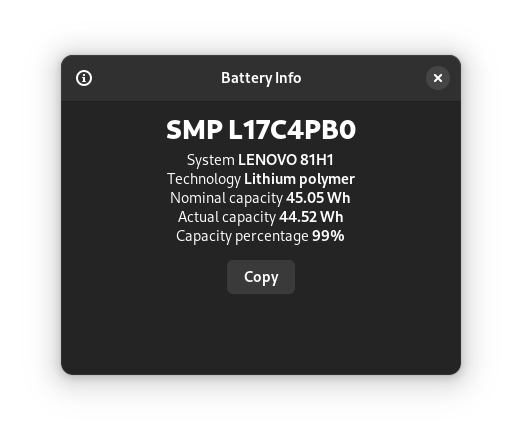
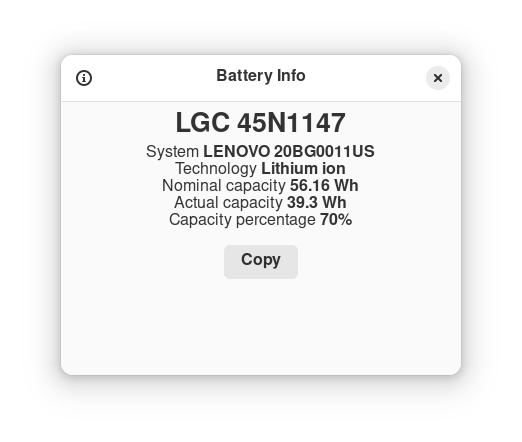
- Vendor and Model Details: Instantly identify the manufacturer and specific model of your installed battery pack.
- Chemistry and Technology: Verify the exact battery technology (such as Lithium-Ion or Lithium-Polymer) powering your system.
- Nominal Capacity: View the original design capacity specified by the factory, measured in milliampere-hours (mAh) or watt-hours (Wh).
- Actual Capacity: See the maximum charge the battery can currently hold in its degraded state.
- Capacity Ratio: View a precise health percentage (the ratio of actual capacity to nominal capacity) to understand overall wear.
Who Is This Linux Tool For?
If you rely on a Linux laptop for remote work, travel, or development, knowing your power limits is essential. System administrators, hardware enthusiasts, and everyday mobile users will find value in having immediate access to these health diagnostics. It is particularly useful when buying a used laptop, as it lets you instantly verify the physical condition of the power cell before committing to the purchase.
Get Reliable Insights Today
Rather than guessing how much runtime your laptop has left, get precise data directly from your hardware. To explore this utility further and add it to your system, head over to the official Flathub store page to review the application and view installation details for your distribution.
Rate the App
User Reviews
Other Apps in This Category



Popular Apps










Editor's Choice